 ChatGPT Grow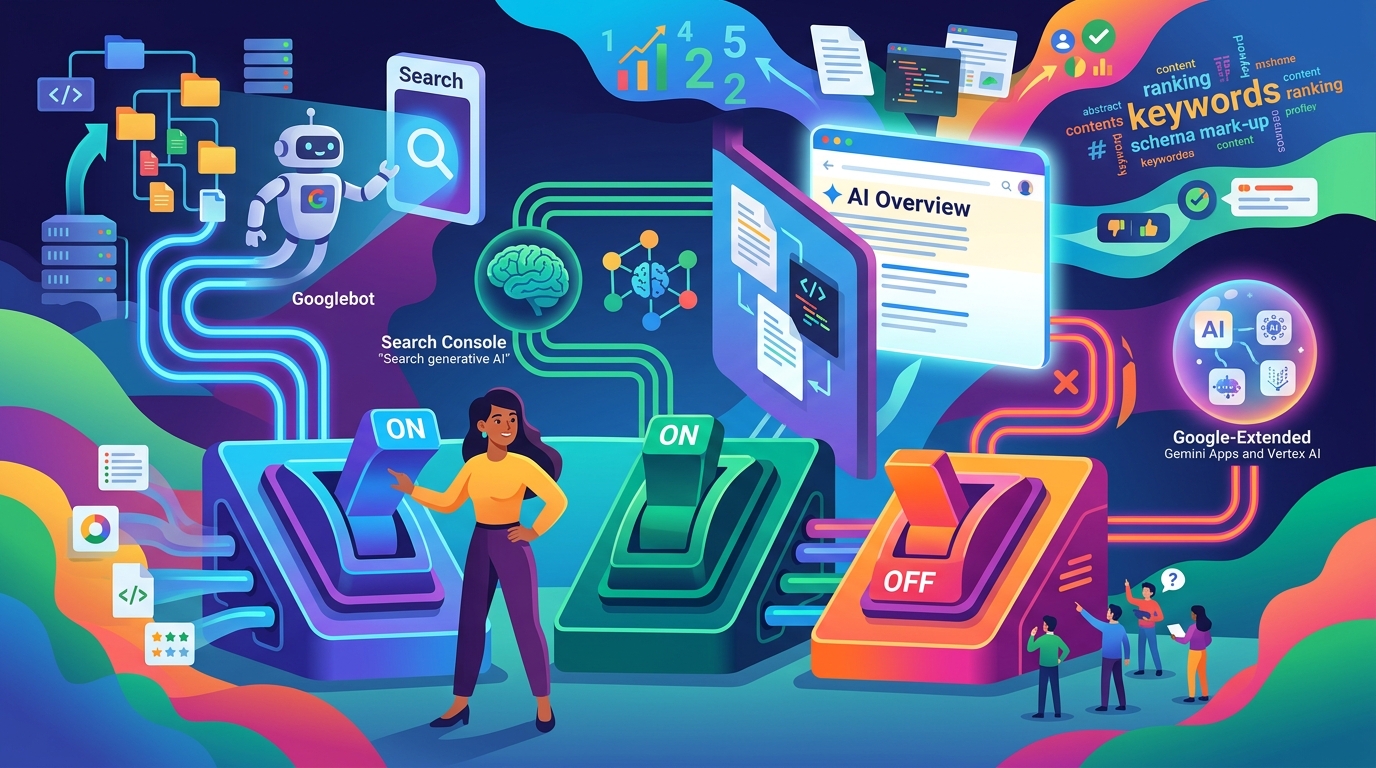
Why Your Pages Are Not in Google AI Overviews — Three Switches, Only One of Which Most Guides Mention
Google documents three separate controls that affect AI features in Search. Blocking Google-Extended is not one of them, and the switch that actually excludes you from AI Overviews shipped in June 2026. Here is what each one really does.
September 15, 2026 · 11 min read
By Alex Li, Founder · Contact the author
You rank on page one. An AI Overview appears for the query. It cites three other sites, and not you. The advice you will find online is mostly about content quality, schema, and entity optimisation — and most of it skips the fact that Google documents three separate controls that decide whether your pages can appear in AI features at all.
The short version
- Google's own documentation names the control for AI features in Search: "robots.txt directives for Googlebot is the control for site owners to manage access to how their sites are crawled for Search," plus
nosnippet,data-nosnippet,max-snippet, andnoindex. Google-Extendedis not that control. It is "a standalone product token" for managing whether your site helps improve Gemini Apps and Vertex AI generative APIs. Blocking it does not remove you from AI Overviews. In our audit of 267 sites, 15.5% of a general sample block it.- A Search Console "Search generative AI" control that genuinely excludes a property from AI Overviews, AI Mode, and generative AI in Discover went into effect 17 June 2026 — and it defaults to inclusion. Almost no guide written before then mentions it.
- Ranking is necessary and not sufficient, because AI Overviews are assembled from passages, not positions.
There are three Google switches, and they do different things
The confusion is understandable: three controls, all of which sound like "AI in Search," with three different outcomes.
| Control | What Google documents it as doing | Does it affect AI Overviews? |
|---|---|---|
Googlebot rules in robots.txt | The control for how your site is crawled for Search — Google states this explicitly for AI features | Yes |
nosnippet, data-nosnippet, max-snippet, noindex | "To limit the information shown from your pages in Search" | Yes |
| Search Console → Settings → Search generative AI | Manages inclusion in AI Overviews, AI Mode, and generative AI features in Discover | Yes — and this is the opt-out |
Google-Extended in robots.txt | Managing whether your site helps improve Gemini Apps and Vertex AI generative APIs | No |
If you only read one row, read the last one — it is the control most often mistaken for an AI Overviews switch.
Switch 1: Googlebot access — the one Google names
Google's Search Central documentation on AI features is unusually direct about which lever matters. Its own sentence:
"AI is built into Search and integral to how Search functions, which is why robots.txt directives for Googlebot is the control for site owners to manage access to how their sites are crawled for Search. To limit the information shown from your pages in Search, use
nosnippet,data-nosnippet,max-snippet, ornoindexcontrols."
Two things are worth extracting from that.
There is no separate AI crawler to manage. AI Overviews are not fed by a distinct bot you can allow or disallow. They draw on the same crawled Search index, which is why Google points at Googlebot rather than at an AI-specific token.
The documented way to limit what appears is the snippet controls. This is the practically useful half, and it cuts both ways: if you have nosnippet or a restrictive max-snippet on a page — sometimes inherited from a CMS default or an over-cautious SEO plugin — you have limited what Search, including its AI features, is allowed to show from that page.
Switch 2: the snippet directives you may not know you set
nosnippet, data-nosnippet, and max-snippet are the documented levers for controlling what Search shows from your pages. They are also the ones most likely to be set by accident, because they can be inherited:
- A site-wide
nosnippetinrobots.txtor a meta robots tag applies to every page unless overridden. max-snippet: 0behaves like a full snippet ban.data-nosnippetcan be applied to a container element, so a template change can silently wrap your opening paragraph in it.
The check is one command, and it is worth running on the specific page you expected to be cited rather than on the homepage:
curl -s https://yourdomain.com/your-page | grep -iE "nosnippet|max-snippet|noindex"
Anything returned is a limit you have placed on what Search may display. Given Google's own framing — that these are the controls for limiting information shown in Search — a stray directive here is a more likely explanation for a missing citation than an algorithmic judgement.
Switch 3: the Search Console control that shipped in June 2026
Google now provides a property-level control that genuinely removes a site from AI features in Search. From the Search Console help documentation:
"Use the Search generative AI control to manage your site's inclusion in the following generative AI features on Google Search... AI Overviews, AI Mode, generative AI features in Google Discover."
It lives under Settings → Search generative AI in Search Console, and it went into effect on 17 June 2026, rolling out to a subset of site owners. The default is inclusion.
Read that alongside the other documented detail — that AI Overviews "are a core Google Search feature, like knowledge panels" and, from the user's side, "features cannot be turned off" — and the structure becomes clear. There is no user-facing way to disable AI Overviews, so the only place an exclusion can exist is a property-level setting. Which means: if you cannot find this setting in your Search Console, you have not opted out, and your absence from an AI Overview is not an exclusion you configured.
That last point matters for diagnosis. People who find this setting after the fact often assume they or a previous agency turned it off. Check it before rewriting any content.
What Google-Extended actually does — and the 15.5% who get it backwards
Google-Extended is the control most often mistaken for an AI Overviews switch, and its scope is narrow. From Google's documentation for the user agent:
"
Google-Extendedis a standalone product token that web publishers can use to manage whether their sites help improve Gemini Apps and Vertex AI generative APIs, including future generations of models that power those products."
That is a training and model-improvement control for Gemini and Vertex AI. It is not the AI Overviews switch — Google points at Googlebot and the snippet directives for that.
The misconception is visible in the wild. One vendor article we found while researching this states plainly that Google-Extended "collects content for training Google's AI products, specifically Gemini and Google AI Overviews." That is the error, published, and it is repeated across the category.
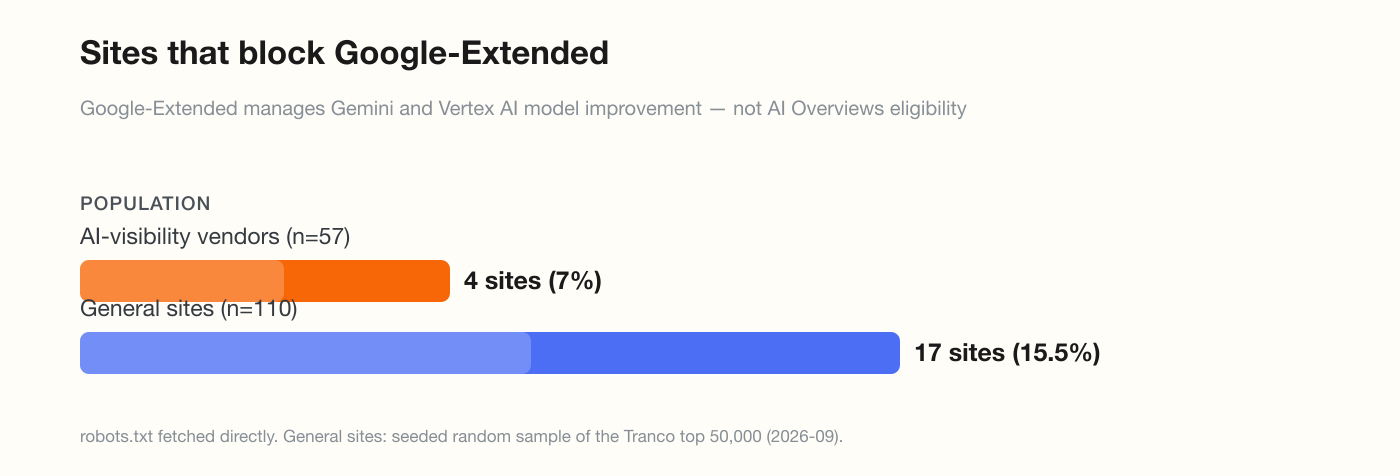
It is also visible in real configurations. In our audit of 267 sites, Google-Extended was blocked by:
| Population | Sites blocking Google-Extended |
|---|---|
| AI-visibility vendors (n=57) | 4 (7.0%) |
| General sites (n=110) | 17 (15.5%) |
Those 17 sites are not protecting themselves from AI Overviews. They have opted out of Gemini and Vertex AI model improvement — a legitimate choice — while leaving Googlebot and snippet directives untouched, which is where actual AI Overviews eligibility lives. If the intent was "keep me out of AI answers," the switch they flipped does not do that.
Ranking is necessary and not sufficient, because the unit is a passage
The reason a page-one ranking does not guarantee a citation is structural, and it follows from how the feature is built. Google's help documentation describes AI Overviews as an AI-generated snapshot assembled from a range of sources, shown "when our systems determine that generative AI can be especially helpful."
The practical consequence is that the unit of selection is not your page or its position — it is whether a coherent, self-contained passage exists on it that answers the sub-question being asked. A page can rank first and contain no liftable answer, which is a content-shape problem rather than a ranking problem. That is the layer our own AI citeability checker tests, with the deliberate caveat that it measures whether content is structured to be citable — "content-level, not actual citation."

The diagnostic order
Work down; each step is cheaper than the one below it.
- Check Search Console → Settings → Search generative AI. If it exists and is off, you have found your answer in under a minute.
- Check
robots.txtfor a Googlebot block. A blanketUser-agent: *withDisallow: /blocks Googlebot too. - Check the page for snippet restrictions.
nosnippet,max-snippet: 0,data-nosnippet,noindex— any of these limits what Search may display. - Confirm the page is actually indexed. A citation requires an index entry; not-indexed pages cannot be quoted.
- Then, and only then, look at content shape. Does the page contain a self-contained answer to the specific question, near the top, without needing the surrounding three paragraphs?
Frequently asked questions
Does blocking Google-Extended remove my site from AI Overviews?
No. Google documents Google-Extended as "a standalone product token that web publishers can use to manage whether their sites help improve Gemini Apps and Vertex AI generative APIs." For AI features in Search, Google's documentation points at Googlebot robots.txt rules and the snippet controls (nosnippet, data-nosnippet, max-snippet, noindex) instead.
How do I opt out of AI Overviews? Use the Search generative AI control in Search Console, under Settings. Google documents it as managing your site's inclusion in AI Overviews, AI Mode, and generative AI features in Discover. It went into effect 17 June 2026 and is rolling out to a subset of site owners; the default is inclusion.
Can users turn off AI Overviews? Google's help documentation states that AI Overviews "are a core Google Search feature, like knowledge panels" and that "features cannot be turned off." It offers the Web filter after a search, which returns text-based links without features like AI Overviews, but that is a per-search choice rather than a setting.
I rank number one but an AI Overview cites three other sites. Why? AI Overviews are assembled from passages across multiple sources, so selection operates at the level of a self-contained answer rather than a page position. Ranking gets your page into the candidate pool; whether a coherent, liftable passage exists on it is a separate property.
Could a CMS or plugin be blocking me without my knowledge?
Yes, for snippet directives in particular. nosnippet, max-snippet: 0, and data-nosnippet can be inherited site-wide or applied to a template container. Google frames these as the controls for limiting what Search shows from your pages, so an inherited directive is a plausible explanation for a missing citation.
How many sites block Google-Extended by mistake?
In our audit of 267 domains, 15.5% of a random sample of general websites (17 of 110) block Google-Extended, versus 7.0% of AI-visibility vendors. Blocking it is a valid choice for opting out of Gemini and Vertex AI model improvement — but it does not affect AI Overviews eligibility.
Two of the three switches are free to check
Search Console settings, robots.txt, and a single curl cover switches one through three. Run all three before you spend a week rewriting content, because content work cannot fix a page that Search is not permitted to quote.
When the switches are clean and you are still uncited, the remaining problem is passage shape — whether your page contains one answer, in one place, that can be lifted without its context. That is what ChatGPT Grow is built to produce: a customer question turned into original research and a published article, one a day, on autopilot.
Sources. AI feature controls and the Googlebot/snippet framing: Google Search Central, "AI Features and Your Website." AI Overviews behaviour and availability: Google Search Help, "Find information in faster & easier ways with AI Overviews." The Search generative AI control: Google Search Console Help, "Search generative AI control." Google-Extended scope: Google's user-agent documentation as updated, quoted via Search Engine Journal. Configuration figures are from our own audit of 267 domains, detailed in GPTBot vs OAI-SearchBot. Google's controls changed materially in June 2026; verify against current documentation before acting.